Theme Engine
What is Theme Engine of The Fox? If you purchase The Fox theme after July 25, 2023 then you have theme engine v6. If you purchased and used The Fox theme before that, you have theme engine v5. You can see your theme engine in Dashboard > Fox Magazine > System Info.
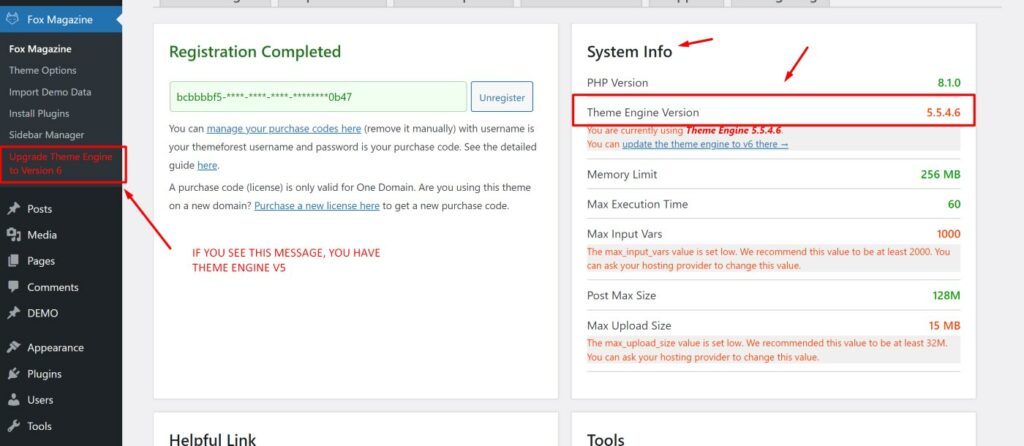
If you don’t see anything, It means your theme engine is v6 and you can skip this entire page.
If you updated to The Fox version 6 from Fox version 5 then there are 2 options:
- You can chooes to keep using theme engine version 5.
- You can update theme engine to theme engine version 6.
What is the difference?
- Theme Engine v6 is faster than v5 significantly and will be updated in the future. Theme Engine v5 will be maintained and supported to fix bugs but we will not add new features to it.
- Engine v6 has different Customizer. It’s more comprehensive but different from v5.
- Many theme features will be added to theme engine v6, including the better home page builder, more single post options.. However, certain theme features will be deprecated and removed in theme engine v6.
Why The Fox has a new Theme Engine?
- The Fox theme has been developed since 2015. After years, It’s slow and outdate. Though It’s still running perfectly but It’s hard to add new features and impossible to make it fast.
- To keep theme being up to date and developed, we need to build a new theme engine.
Should I update the Theme Engine?
- If your site is running stable with traffics and you’re not happy with changing the theme engine, you can update The Fox v6 with keeping Theme Engine v5. It’s working well.
- If you lack of time and not being ready, you should keep Theme Engine v5 until you have time.
- If you want to use latest features from v6: Dark Mode switcher, Ultra fast speed, faster and more powerful option panel, more powerful Homepage Builder… then you can consider updating the theme engine to v6.
Is my data safe if I update theme engine?
Yes, your posts, pages, media, settings.. everything is safe. You can also switch back to previous theme engine V5 ANYTIME after upgrading with a click in Dashboard > Fox Magazine > Switch back to engine v5.
What if I don’t update the theme engine?
Nothing bad happens. A lot of people today is still using Windows 7 (or even XP), old iOS or Android versions.. and a lot of people decide to update to the latest version. It’s the same for this situation.
How to update Theme Engine?
Step 1: Go to Dashboard > The Fox Magazine > Upgrade Theme Engine to v6.
Step 2: Hit button “Upgrade” and wait.
How to switch back to Theme Engine v5?
Step 1: Go to Dashboard > The Fox Magazine > Switch Theme Engine to v5.
Step 2: Hit button “Switch back” and wait.